
** Disclaimer: I'm not responsible if you blow up your game and try at your own risk  **
**
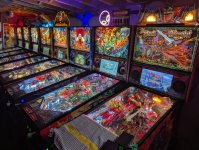
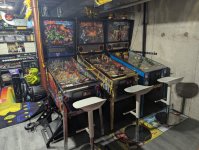
I know this has been done and documented on pinside that is 3-4 pages long, I thought I would just give you a single post with detailed pics of what I did to accomplish this. In the past whenever I got a new Stern with IC the very first mod I would do it pull it out and sell for $160-180 and use towards a shaker motor. I was over at a friend's few months ago and played his pin with IC connect. I thought it was kinda neat to see or hear achievements unlock so I started collecting parts to do this shared setup using only one QR code scanner.
Assuming you have one Stern IC QR code scanner here are some parts you will need to complete this setup most of which can be bought from amazon. I used quite a bit of cat5 cable for my setup so if you have the tools like crimper and tester like me might be cheaper to buy a box of 50'-100' and pack of ends. Otherwise you can get pre-made cat5 cables from amazon.ca or Princess Auto for $3-5 from 10-25' lengths.
Here are some things to note:
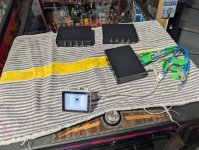
1. The 4 Port Manual switch is a "dumb" switch and just literally acting as a 1 to multi 4 port manual splitter. You can not use a regular 10/100/1000 network switch or POE (power over ethernet) switch you might have kicking around. If you try using a POE switch and send 24V or 28V to your Stern node boards you will likely fry them and void your warranty if you have so you've been warned. Depending on how many Sterns you want to share the one QR scanner a single 4 Port Switch can do up to 4 pins. If you need to do more then two 4 Port Switches can do up to 7 pins and three 4 Port Switches can do up 10 pins... etc (keep reading below and this will make sense).
2. These couplers are optional as you can hard wire each pin to the switch box but you need to make sure you have enough cable slack in case you need to pull your pin forward to service. Having a coupler allows you to easily disconnect the network cable without having to open up your head or cabinet depending which node board you connecting the QR scanner to. Get as many as you need for your pins and you don't need a 25 pack like me. I can't remember but there was probably a coupon code and the price difference from a 10 pack to 25 pack wasn't much difference and these couplers can come in handy later on for other things around the house.
3. You will need a Wifi adapter for each pin in order for Stern IC to work. Otherwise the other alternative is you could hard wire each game using cat5 to a regular network switch to your home network/router. The only advantage of hardwiring is downloads and game code updates will be faster then over Wifi but means more cables! If you do go hard wire route the network port to use in the head it the single one on the very top.
4. You will need a microsd card for each pin in order for Stern IC to work as well. I don't think you need any larger then 32GB and I think you could even get away with cheaper no-name brands. The important thing is these need to be formatted using FAT32 before you insert in board in the head.
5. Now if you have a Stern factory topper like my friend's Black Knight I am baby sitting you will need a RJ45 ethernet splitter like this. Your topper will be occupying the only free port on the node board in the head. Alternatively you could connect your cable to the node board under the apron where the QR scanner is attached from factory but I would recommend connecting to board in head and feeding out the top. If you want to connect to node board under the apron this means you will need more cable to have enough cable slack to raise your playfield.
Alright now that we got all that out of the way here we go!
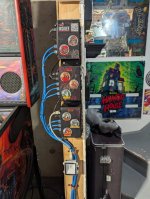
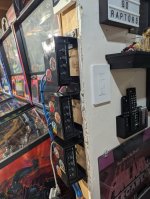
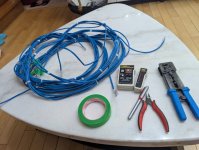
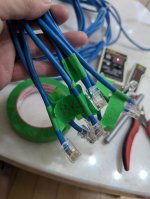
So I could have bought premade network cables for pretty cheap I decided to crimp my own and ran exact lengths from each pin to where I was planning to mount all my switch boxes. This way things will be kept nice and tidy without me having to coil up any excess cable. I zip tied it so it's all in one trunk before I started crimping and used my tester to label the ends for each game.
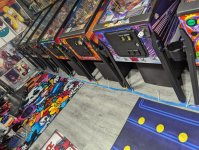
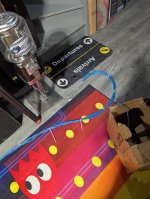
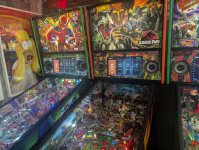
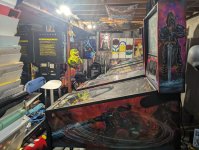
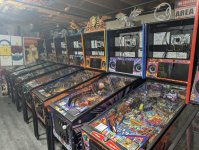
Now comes the hard and tedious part which is pulling all my games forward and don't laugh at the amount of dust on all my games but I haven't turned on or played a single pin in 2 years. Funny thing I could have started this project months ago but I was waiting on my friend to put his order through at Marco to get a Stern IC kit. It turns out I had a QR scanner on my friend's Black Knight that I've been babysitting for past 2 years but things in my personal life sorta went to the shits and pinball hobby was the furthest thing away from my mind unfortunately
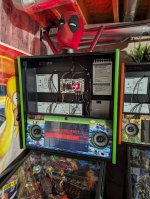
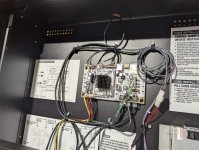
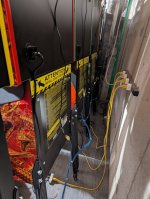
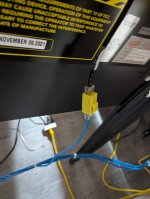
Once I had access to each pin's head I fed a 5' pre-made black network cable connected to node board and out the hole on top used for toppers. Then I used a yellow coupler for each game and connected my main trunk of cables I made to each game which lead to the 4 port switch boxes.
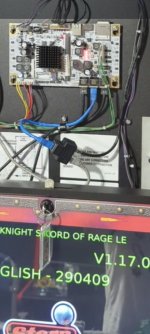
Now for my friend's Black Knight SOR I had to use one of those RJ45 splitters since it has that awesome factory topper.
**I know this has been done and documented on pinside that is 3-4 pages long, I thought I would just give you a single post with detailed pics of what I did to accomplish this. In the past whenever I got a new Stern with IC the very first mod I would do it pull it out and sell for $160-180 and use towards a shaker motor. I was over at a friend's few months ago and played his pin with IC connect. I thought it was kinda neat to see or hear achievements unlock so I started collecting parts to do this shared setup using only one QR code scanner.
Assuming you have one Stern IC QR code scanner here are some parts you will need to complete this setup most of which can be bought from amazon. I used quite a bit of cat5 cable for my setup so if you have the tools like crimper and tester like me might be cheaper to buy a box of 50'-100' and pack of ends. Otherwise you can get pre-made cat5 cables from amazon.ca or Princess Auto for $3-5 from 10-25' lengths.
Here are some things to note:
1. The 4 Port Manual switch is a "dumb" switch and just literally acting as a 1 to multi 4 port manual splitter. You can not use a regular 10/100/1000 network switch or POE (power over ethernet) switch you might have kicking around. If you try using a POE switch and send 24V or 28V to your Stern node boards you will likely fry them and void your warranty if you have so you've been warned. Depending on how many Sterns you want to share the one QR scanner a single 4 Port Switch can do up to 4 pins. If you need to do more then two 4 Port Switches can do up to 7 pins and three 4 Port Switches can do up 10 pins... etc (keep reading below and this will make sense).
4 Port Way 8P8C RJ45 Network Ethernet Manual ABCD Sharing Switch Box,4 Ports Network Switch Splitter Selector Hub 4-in 1-Out or 1-in 4-Out
2. These couplers are optional as you can hard wire each pin to the switch box but you need to make sure you have enough cable slack in case you need to pull your pin forward to service. Having a coupler allows you to easily disconnect the network cable without having to open up your head or cabinet depending which node board you connecting the QR scanner to. Get as many as you need for your pins and you don't need a 25 pack like me. I can't remember but there was probably a coupon code and the price difference from a 10 pack to 25 pack wasn't much difference and these couplers can come in handy later on for other things around the house.
VCE CAT6 Keystone Coupler UL Listed 25-Pack, RJ45 Ethernet Coupler Female to Female UTP for Cat6/Cat5e/Cat5 Cable, Yellow
3. You will need a Wifi adapter for each pin in order for Stern IC to work. Otherwise the other alternative is you could hard wire each game using cat5 to a regular network switch to your home network/router. The only advantage of hardwiring is downloads and game code updates will be faster then over Wifi but means more cables! If you do go hard wire route the network port to use in the head it the single one on the very top.
TP-Link USB WiFi Adapter for PC(TL-WN725N), N150 Wireless Network Adapter for Desktop - Nano Size WiFi Dongle for Windows 11/10/7/8/8.1/XP/ Mac OS 10.9-10.15 Linux Kernel 2.6.18-4.4.3, 2.4GHz Only
4. You will need a microsd card for each pin in order for Stern IC to work as well. I don't think you need any larger then 32GB and I think you could even get away with cheaper no-name brands. The important thing is these need to be formatted using FAT32 before you insert in board in the head.
SanDisk 32GB 2-Pack Ultra microSDHC UHS-I Memory Card (2x32GB) - SDSQUA4-032G-GN6MT
5. Now if you have a Stern factory topper like my friend's Black Knight I am baby sitting you will need a RJ45 ethernet splitter like this. Your topper will be occupying the only free port on the node board in the head. Alternatively you could connect your cable to the node board under the apron where the QR scanner is attached from factory but I would recommend connecting to board in head and feeding out the top. If you want to connect to node board under the apron this means you will need more cable to have enough cable slack to raise your playfield.
2 Pack RJ45 Ethernet Splitter Connector Adapter,1 to 2 Port Female Socket Adapter Interface Ethernet Cable 8P8C Extender Plug LAN Network Connector for Cat5, Cat5e, Cat6, Cat7
2 Pack RJ45 Ethernet Splitter Connector Adapter,1 to 2 Port Female Socket Adapter Interface Ethernet Cable 8P8C Extender Plug LAN Network Connector for Cat5, Cat5e, Cat6, Cat7 : Amazon.ca: Electronics
2 Pack RJ45 Ethernet Splitter Connector Adapter,1 to 2 Port Female Socket Adapter Interface Ethernet Cable 8P8C Extender Plug LAN Network Connector for Cat5, Cat5e, Cat6, Cat7 : Amazon.ca: Electronics
www.amazon.ca
Alright now that we got all that out of the way here we go!
So I could have bought premade network cables for pretty cheap I decided to crimp my own and ran exact lengths from each pin to where I was planning to mount all my switch boxes. This way things will be kept nice and tidy without me having to coil up any excess cable. I zip tied it so it's all in one trunk before I started crimping and used my tester to label the ends for each game.
Now comes the hard and tedious part which is pulling all my games forward and don't laugh at the amount of dust on all my games but I haven't turned on or played a single pin in 2 years. Funny thing I could have started this project months ago but I was waiting on my friend to put his order through at Marco to get a Stern IC kit. It turns out I had a QR scanner on my friend's Black Knight that I've been babysitting for past 2 years but things in my personal life sorta went to the shits and pinball hobby was the furthest thing away from my mind unfortunately
Once I had access to each pin's head I fed a 5' pre-made black network cable connected to node board and out the hole on top used for toppers. Then I used a yellow coupler for each game and connected my main trunk of cables I made to each game which lead to the 4 port switch boxes.
Now for my friend's Black Knight SOR I had to use one of those RJ45 splitters since it has that awesome factory topper.