
• We have upgaded to the latest version of XenForum and the process finished without any errors!!!! Enjoy the new forum!

Pandora's box button mapping

slither

Member
Mar 23, 2013
365
12
18
Portland, Ont.
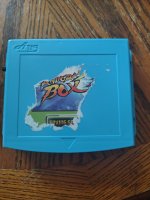
So I purchased an arcade cab running an older Pandora's box. The player buttons are unresponsive,except to access the setup menu. The joysticks are working as they should. I can get to the menu, but no buttons work to select the options. I think the buttons mapping has been cleared. Does anyone know a way to get back in and set up the buttons. Box is older, no usb etc...
 

Attachments

  • IMG_20250926_155724251_HDR.jpg
    IMG_20250926_155724251_HDR.jpg
    124.2 KB · Views: 1

MrMikeman

Super Member
Nov 25, 2019
1,087
952
113
Ottawa
So I purchased an arcade cab running an older Pandora's box. The player buttons are unresponsive,except to access the setup menu. The joysticks are working as they should. I can get to the menu, but no buttons work to select the options. I think the buttons mapping has been cleared. Does anyone know a way to get back in and set up the buttons. Box is older, no usb etc...
It’s more likely that the ground chain is broken between the joysticks and buttons.
 

MrMikeman

Super Member
Nov 25, 2019
1,087
952
113
Ottawa
Odd for sure. I have a bunch of Pandora boxes lol. At least 5 or 6. Some JAMMA, some not. Some CRT compatible, others VGA and/or HDMI. Never had one that didn’t recognize buttons at all. Did you try P2 joystick and buttons as well?
 

slither

Member
Mar 23, 2013
365
12
18
Portland, Ont.
Hey....yes I did...I press the start button, to access the setup menu after it loads. The joysticks allows me to scroll through the options, but no buttons seem to work to select any of them...I'm wondering if I put the SD card in a reader, if the keyboard will work to access it?....or possibly it has been set up with a hotkey combo that I haven't discovered yet...lol... appreciate the input...