• We have upgaded to the latest version of XenForum and the process finished without any errors!!!! Enjoy the new forum!

How easy is it to update a Pinball 2000 to the 2.50 RFM code??

ALJO

Active Member
Apr 6, 2013
480
108
43
St.Romuald
A friend did it for me on my RFM about 2 years ago and now I've been accepted to test the new code for SWEP1 (along with 9 others) and so I need to update my SWEP1 computer with the new code.
Could anyone guide me a little here, I've read the instructions on the site but I'm a dummy at understanding computer language, is it straight forward and pretty easy for the common human. :)
Thanks.
 
Last edited:

ALJO

Active Member
Apr 6, 2013
480
108
43
St.Romuald
Found this video on Youtube, is it the good procedure?
I had to look at it a couple of times to understand and I'm not even quite sure yet that got it......mostly the last part of the video where you download the update on the computer from the USB key.
 

MrMikeman

Super Member
Nov 25, 2019
1,087
952
113
Ottawa
There is no USB port on the P2000 computer. It’s way older than that. Update method depends if you have an original computer or a Nucore computer.
 

ALJO

Active Member
Apr 6, 2013
480
108
43
St.Romuald
It's an original computer and that's why I thought that video would be a good one for me because I also saw another video for Nucore and Pinbox.
The guy in the video says to upload the software on a USB port from the computer and not from the "game's computer"
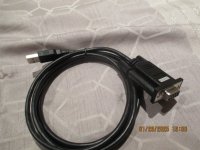
I bought this:
 

Attachments

  • IMG_0576.JPG
    IMG_0576.JPG
    139.6 KB · Views: 4

ALJO

Active Member
Apr 6, 2013
480
108
43
St.Romuald
I read that plus the instruction sheet on his sight.
I have up to the 1st of February to make the update with the link he sent me, so that's tomorrow and friday and then it's over, the link will be expired.
I'll try doing what the guy explains in the video and we,ll see if I can do it.......
Thanks I appreciate your help but I understand that it's not easy explaining to dummy, and there's no sarcasme at all when I say that, I am a dummy at computer stuff, that's all.
 

MrMikeman

Super Member
Nov 25, 2019
1,087
952
113
Ottawa
I read that plus the instruction sheet on his sight.
I have up to the 1st of February to make the update with the link he sent me, so that's tomorrow and friday and then it's over, the link will be expired.
I'll try doing what the guy explains in the video and we,ll see if I can do it.......
Thanks I appreciate your help but I understand that it's not easy explaining to dummy, and there's no sarcasme at all when I say that, I am a dummy at computer stuff, that's all.
From what I remember it was straight forward with the program.
 

ALJO

Active Member
Apr 6, 2013
480
108
43
St.Romuald
Now I have to install the hardware for the USB to port cable and I can't do it, according to the installation instructions there should be a hardware wizard that appears on the screen when I plug in the USB and nothing happens.
I give up, I'm out, this is too overwhelming for me, I'll need help from someone who knows what he's doing.
 

ALJO

Active Member
Apr 6, 2013
480
108
43
St.Romuald
After giving it some thought, and further investegating as well, I think that either the USB to serial cable was already configured on my computer or, I configured it without know because when I plug in the cable and that I go to see peripheral on my computer, I see the name of my USB to serial cable appear and dissapear when unplugged.
I think I'll try installng the update tomorrow.
 

ALJO

Active Member
Apr 6, 2013
480
108
43
St.Romuald
If it's not too much asking Mike, could you please watch the video and tell me if that's the way you updated your RFM a few years ago? because if I remember well (with my friend) it was'nt so complicated.
Thanks.
 

MrMikeman

Super Member
Nov 25, 2019
1,087
952
113
Ottawa
I never was able tomupdate like in the video. I used the program I posted a link for 2 posts up. Super simple. Plug it in, select the code version you want to send, and then hit send.

it’s been a long time. I don’t remember the specifics. If you were local I’d help in person.
 

ALJO

Active Member
Apr 6, 2013
480
108
43
St.Romuald
Thanks, only one sentence I don't understand in what you say, what does "I posted a link for 2 posts up" mean?
I downloaded the new SWEP1 file on my computer now, so I'm not in a hurry like I thought I was in the beginning, I can take my time and find someone to help, even if it's for next week.
 

Paul

Well-Known Member
Feb 21, 2013
564
460
63
NewBrunswick
Look at the next post after you show the pic of the UBS you show. At the bottom of MrMikeman post you can hit on it and it takes you to a link.
 

ALJO

Active Member
Apr 6, 2013
480
108
43
St.Romuald
Thanks Paul but I read and reread that page many times, there are no details on how to do the update, only the main lines.
I really need details, otherwise I have no idea what to do.
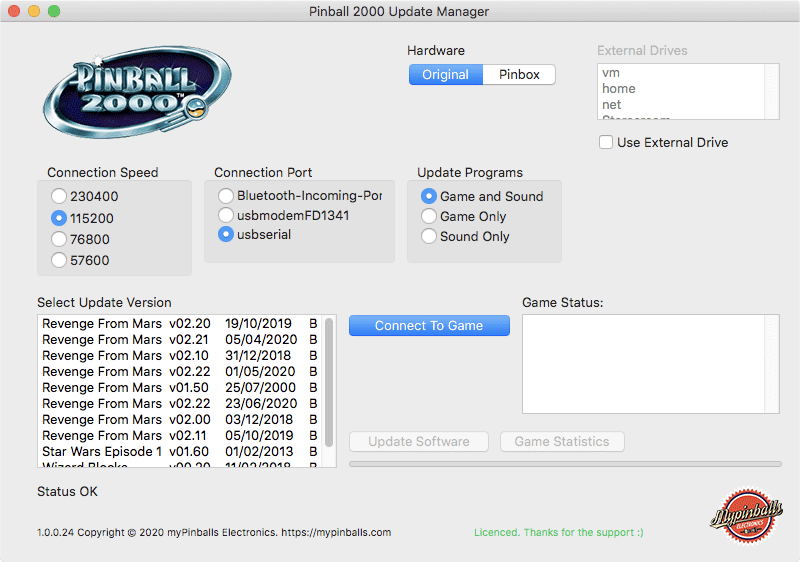
On another note, how do I get to the this screen? Do I need to connect the cable to the game, or is it something else?
Pinball 2000 Software Update Default Screen
When the
 

ALJO

Active Member
Apr 6, 2013
480
108
43
St.Romuald
I know that the video I posted is not the simplest way to do it but since he's the only guy that explains in detail I'll go that way.
I'll be back with an update soon.
Thanks for the help everyone, I appreciate it.
 

MrMikeman

Super Member
Nov 25, 2019
1,087
952
113
Ottawa
I think you are misunderstanding things.

The SW update is NOT the screenshot you posted. The update is just code that goes on the pinball machine. The screenshot is the program you use to update the pinball machine.

Yes it needs to be connected. You need to select the correct port. You need to tell that program where that update you downloaded is located on your computer.

In that screenshot you posted, all the options are selected correctly for your setup.

That program is not free. If you are just using the free demo version it will not work.

The other option is to follow the instructions in the video you provided. I never was able to make that method work, which is why I ended up buying the update program that actually works.
 

ALJO

Active Member
Apr 6, 2013
480
108
43
St.Romuald
Yes, I understand that what I posted is not the update but I just wanted to know how I get to that screen.
The program is not free when tested and debugged but it was sent to me free for testing purposes and I am aware that there are many bugs in it, the guy told me not to share the program because there are many bugs in it.
The guy in the video updated with the original 1.5 version when he was already at 2.23 (custom version) only for making the video.
You ended buying the Mypinballs program Mike?
 

MrMikeman

Super Member
Nov 25, 2019
1,087
952
113
Ottawa
Yes I did. However I also ended up switching the computer to Nucore shortly after. It was way worse to update Nucore as it's Linux and I struggled big time. It was easier (but slow) to use the original computer with the Mypinballs updater program.

It's a bit of a pain the first time because you have to set things up but the next times will be way easier.